Automating Lead List Building From Niche Industry Directories
Bypassing static databases by scraping live directories delivers fresher, niche-specific leads.
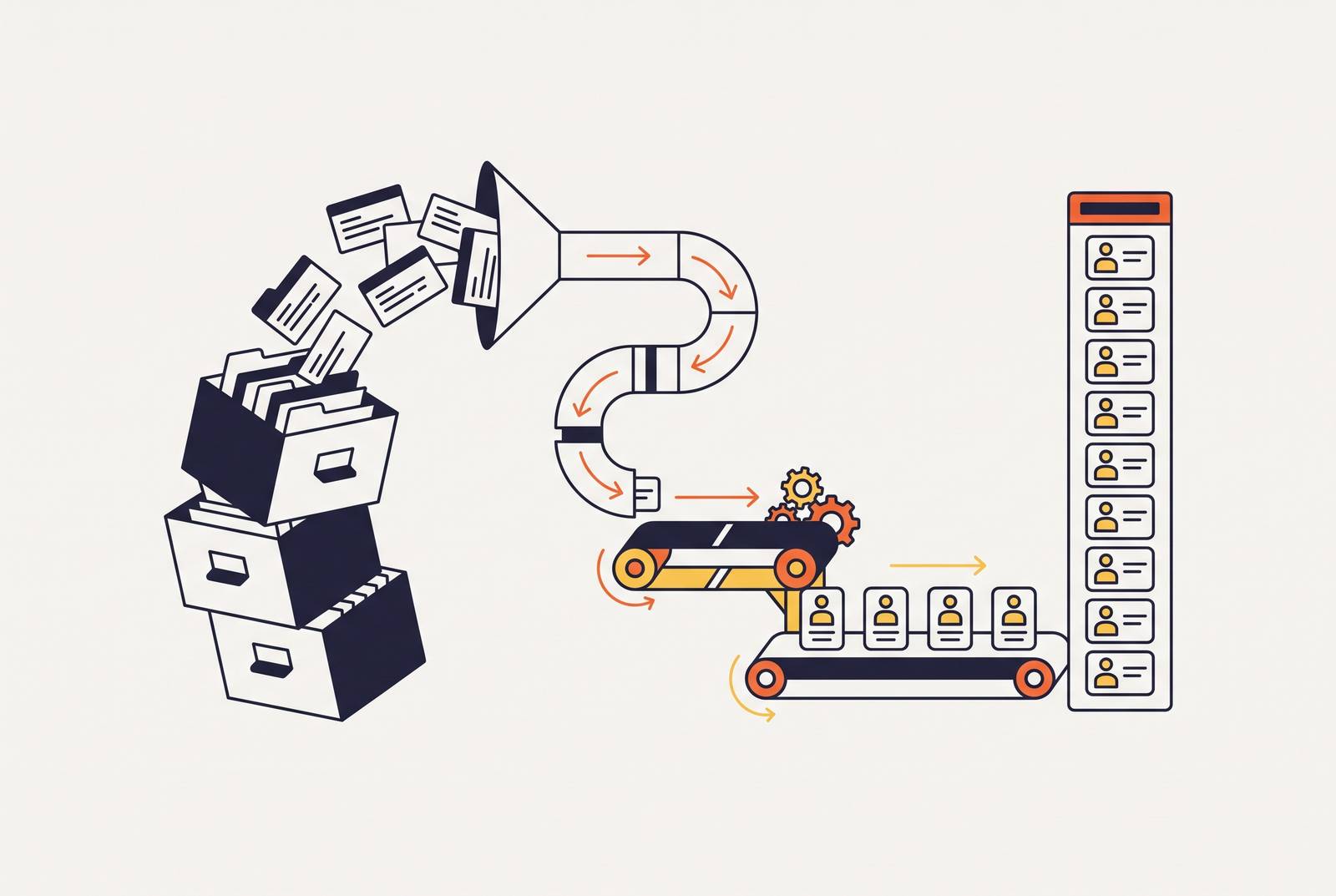
Static B2B databases miss niche industry contacts because of how they're built, not because of some fixable bug. Their coverage depends entirely on contacts that have already been found, checked, and licensed by someone else. Anything outside that loop simply doesn't exist to them.
Why static B2B databases structurally miss niche industry contacts
The failure is quiet, and that's what makes it dangerous. A missing contact doesn't throw an error or flag a warning. A missing contact just doesn't show up, so a sales team has no way of knowing the universe they're working from is smaller than it should be. Trade association member rosters, specialty certification bodies, local service aggregators, and marketplaces built for one specific vertical are exactly the sources a conventional database skips, and Leadspicker has pointed out that prospects sitting on job portals, Google Maps, and niche directories don't exist in any static database at all. The gap is visible hardest in healthcare professional directories, B2B service marketplaces, local service aggregators, and specialized trade networks, each one keeping its own structured listings well outside the reach of the big providers.
The enterprise tools built to solve this problem work, but only for teams that can afford them. ZoomInfo handles enterprise firmographic data well, but LeadScrape's 2026 guide puts its annual cost well out of reach for lean or niche-focused teams, and even a LinkedIn Sales Navigator subscription, paid monthly or annually, hands back no direct email addresses at all. So a team that only prospects through licensed databases is working from a smaller pool than a competitor willing to pull contacts straight from the directories where they actually live. That's the opening live web extraction is built to close.
Live web extraction for a directory lead pipeline
Live extraction skips the database lookup entirely, and it fetches the directory page itself, so the directory's own structure becomes the source of truth. A lead list built this way is only as old as the directory's last update, not as old as some vendor's last crawl cycle.
The shift is mechanical but important: instead of asking a database "find me contacts matching this filter," the pipeline goes straight to the live listing page, reads its structure, and pulls the fields out directly. Directory pages tend to cooperate with this approach. Member listings, partner pages, and certification databases usually lay out company name, address, phone, website, and sometimes category in predictable HTML patterns, which makes them a tractable target for structured extraction rather than a guessing game.
Once the data's out, it needs a format that fits where it's going next. Three formats cover most pipeline needs: Markdown feeds cleanly into downstream enrichment steps, excerpts pull the single most relevant passage out of a long listing page, and structured JSON drops directly into a CRM or data warehouse without anyone needing to reshape it first. That format choice sounds like a small detail, but it decides whether the next stage of the pipeline runs on autopilot or needs a human to clean things up first.
The four-stage pipeline architecture: Source, Enrich, Score, Route
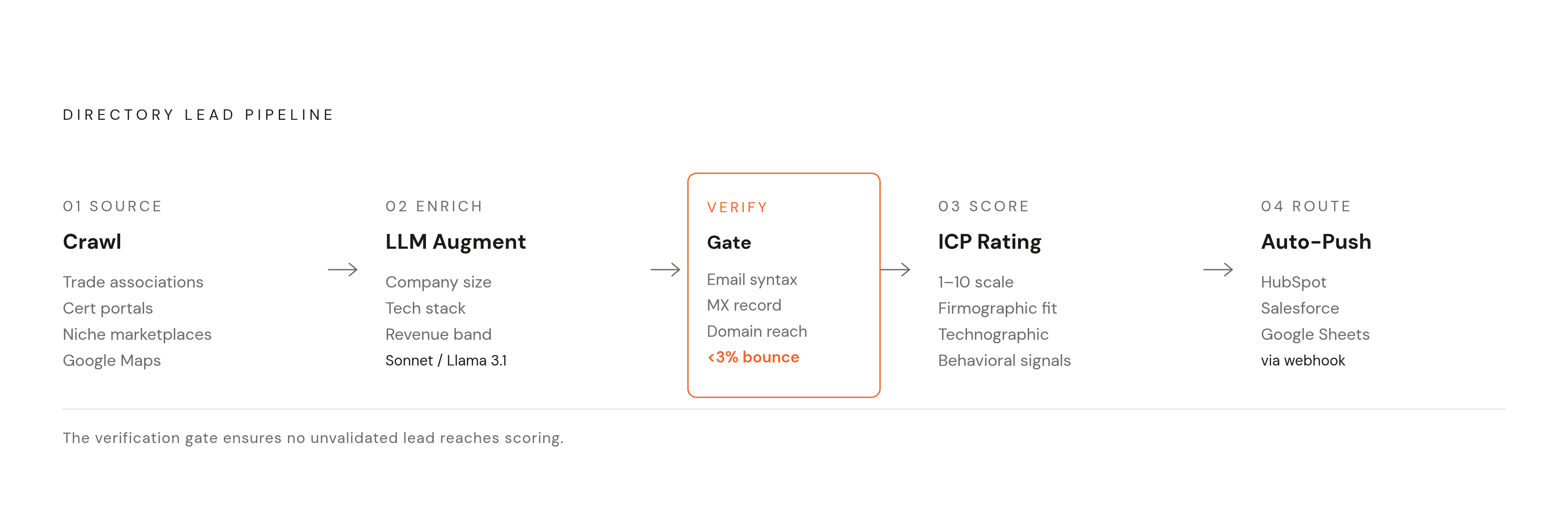
Picture the whole pipeline as four stations on an assembly line, where each one hands off a slightly more finished product to the next. Stitched together with an orchestration layer, Source, Enrich, Score, and Route turn a raw directory crawl into a scored, CRM-ready lead record.
Stage 1, Source, is where the crawl happens. The pipeline targets trade association member lists, specialty certification portals, niche B2B marketplaces, local service aggregators, and Google Maps category searches built around the vertical in question. From there it crawls the listing index to collect individual page URLs, using a sitemap or working through pagination by hand if no sitemap exists. The fields to grab at this stage are company name, address, phone line, website URL, category or membership tier, and any certifications the listing displays publicly.
Stage 2, Enrich, takes that bare-bones record and adds context an LLM can infer or look up: company size estimate, tech stack signals, revenue band, and whatever ICP attributes the directory page didn't include. Which model does the enriching is a real decision, not an afterthought. The 2026 pipeline research points to Claude API (Sonnet) for higher-quality enrichment when daily volume is manageable, and a self-hosted Ollama running Llama 3.1 for bulk runs, where the cost is just a VPS bill and the tradeoff is slightly lower output quality. The practical rule: Claude for the leads that matter most, Ollama for the leads that just need to get processed. But whichever model runs the job, you have to lock down the output schema. LLM enrichment left unchecked returns inconsistent field names, so a strict JSON Schema enforced at the prompt level is required, with post-processing normalization catching whatever slips through anyway. Waterfall enrichment tools like Clay can round out this stage further, cascading a record across multiple data providers to fill in whatever the LLM couldn't infer on its own.
Stage 3, Score, is where the pipeline decides which leads deserve attention first. A second LLM call, or a rules-based scoring layer, rates each enriched record on a 1 to 10 scale against the defined ICP. The inputs feeding that score include firmographic fit, technographic alignment, behavioral signals where they're available (a recent funding round, a new C-suite hire, job postings that hint at a coming purchase), and the category match the directory itself already provided. The goal of this stage is to produce the list with the highest concentration of good fits, a different target entirely from maximum volume.
Stage 4, Route, pushes the finished, scored record into wherever the sales team actually works. Records that clear the scoring threshold get pushed automatically into HubSpot, Salesforce, or a Google Sheets staging layer through a webhook or API call. An orchestration layer like n8n or Make.com runs the whole pipeline on a recurring schedule, with weekly re-crawls of the source directories catching new members or updated listings as they appear. This kind of automated routing isn't hypothetical. Together AI used Unify to run this exact pattern, prospecting and enriching more than 500 high-intent contacts through 5 automated Plays, and Pylon reported a 4.2X return on its Unify investment, with 10 automated Plays running within two weeks of onboarding on the same platform.
A pipeline that runs end to end, on schedule, without anyone touching it, can look like the finish line, but it isn't. But fresh data still rots, so the next problem is what happens to all those clean, scored records between the crawl and the outreach send.
Data decay and verification: why a fresh crawl still needs a quality pass
A freshly crawled contact starts decaying the moment it leaves the source page, so a verification pass is a structural requirement for any pipeline that expects its contacts to actually land in an inbox.
The right place for that check is between Stage 2 (Enrich) and Stage 3 (Score): validate email syntax, check MX records, run a domain reachability check, and flag role-based or catch-all addresses before a bad lead gets a high score it doesn't deserve. Bounce management matters beyond the individual record, too. Once a sender's bounce rate crosses 3%, deliverability drops across every send that sender makes, good addresses included, as mail starts landing in spam folders it never would have reached otherwise.
Directories carry their own specific decay pattern on top of the general one. A member listing can lag actual business status by months, so a business that closed or moved domains can still look perfectly alive in a directory index. Cross-referencing the extracted website URL against a live HTTP check catches those dissolved or redirected businesses before they ever reach the CRM. The long-term fix is a standing re-crawl schedule: pull the source directories weekly or monthly, diff the new extract against the last one, and flag whatever changed or disappeared. This monitoring job runs indefinitely; it's not a single extraction task you check off a list.
Keeping that monitoring running smoothly against directories that don't sit still is its own engineering problem, and it's the one that pushes a pipeline from scheduled scripts toward something closer to an adaptive agent.
Agentic crawlers and directory structures that resist scripted scrapers
A scraper built on fixed CSS selectors is only as reliable as the page layout it was written against, and niche directories don't hold still. A scripted scraper breaks the moment a directory changes its template or adds a new anti-bot measure, and agentic crawlers, ones that can plan a navigation path, notice when something's failed, and route around the obstacle, are the practical fix for that maintenance burden at scale.
The failure mode of a fixed selector is blunt: one layout change in a directory template breaks every job built against it, and the pipeline doesn't throw an alarm. It just quietly returns empty results or malformed records until someone happens to notice. An agentic system swaps that fixed selector for a reasoning loop instead. The agent fetches the page, figures out which fields matter based on the content itself rather than its position on the page, extracts them, and handles pagination or navigation decisions on its own. The upside of that design is self-healing: an agent that can spot a changed layout, work out what broke, and adjust its approach needs very little human oversight to keep running, even after the directory gets redesigned.
MCP, short for Model Context Protocol, built by Anthropic, is the protocol that makes this kind of agentic web access possible at the pipeline level. In plain terms, it lets an agent request the data it needs in the moment, as part of its own reasoning process, rather than running a scheduled job and polling for results afterward. That fits a pipeline that has to navigate multi-page member listings, manage session state, or follow pagination links that change from one directory to the next.
None of this means full LLM extraction belongs everywhere. It's genuinely slower and costs more per page than a deterministic selector, so for directories with highly standardized, high-volume layouts, CSS selectors with an LLM fallback is the more cost-effective setup. Full LLM extraction earns its keep on directories where the layout varies from member to member or shifts often enough that a fixed selector would need constant repair. Alongside that cost tradeoff sits a second one that has nothing to do with engineering: what the law allows a pipeline to collect.
GDPR and the 2026 EDPB guidelines for automated directory extraction
The legal ground under automated directory extraction got noticeably firmer in 2026, but a workable path still exists: build the pipeline to target company-level data rather than named individual contacts pulled from EU-resident listings, and document the basis for collecting it.
Across the major cases shaping this area, one pattern holds steady: publicly available data is generally fair game to scrape, but personal data under GDPR, creative work under copyright, and explicit technical access controls mark the real boundaries, and EU enforcement around them isn't theoretical. On July 7, 2026, the European Data Protection Board adopted Guidelines on web scraping in the context of generative AI, the first comprehensive GDPR framework built specifically to address large-scale extraction of public data for training generative AI models. Under those guidelines, the EDPB now treats robots.txt, ai.txt files, CAPTCHAs, and login walls as relevant signals in the legitimate interest balancing test that decides whether a given scrape is defensible.
For a directory lead pipeline specifically, the line runs right through the contact field itself. An individual business email in the john@company.com format counts as personal data under GDPR, but a generic address like info@company.com, or a main switchboard phone number, carries much lower exposure. A pipeline built around company-level listings, documented collection logic, and a clear read on which fields count as personal data does more than play it safe. You get a version of this architecture built to keep running past 2026 without a legal team shutting it down.
Sources
- Modern B2B lead list building strategies for 2026
- How to Build a B2B Prospect List from Scratch (2026 Guide)
- Leadspicker
- The Most Profitable Niche Directory Markets for 2026
- Best AI Tools to Build a Lead List From a Prompt (2026)
- Automated Lead Generation with AI Agents: Scrape → Enrich → Score → Close (2026 Playbook)